
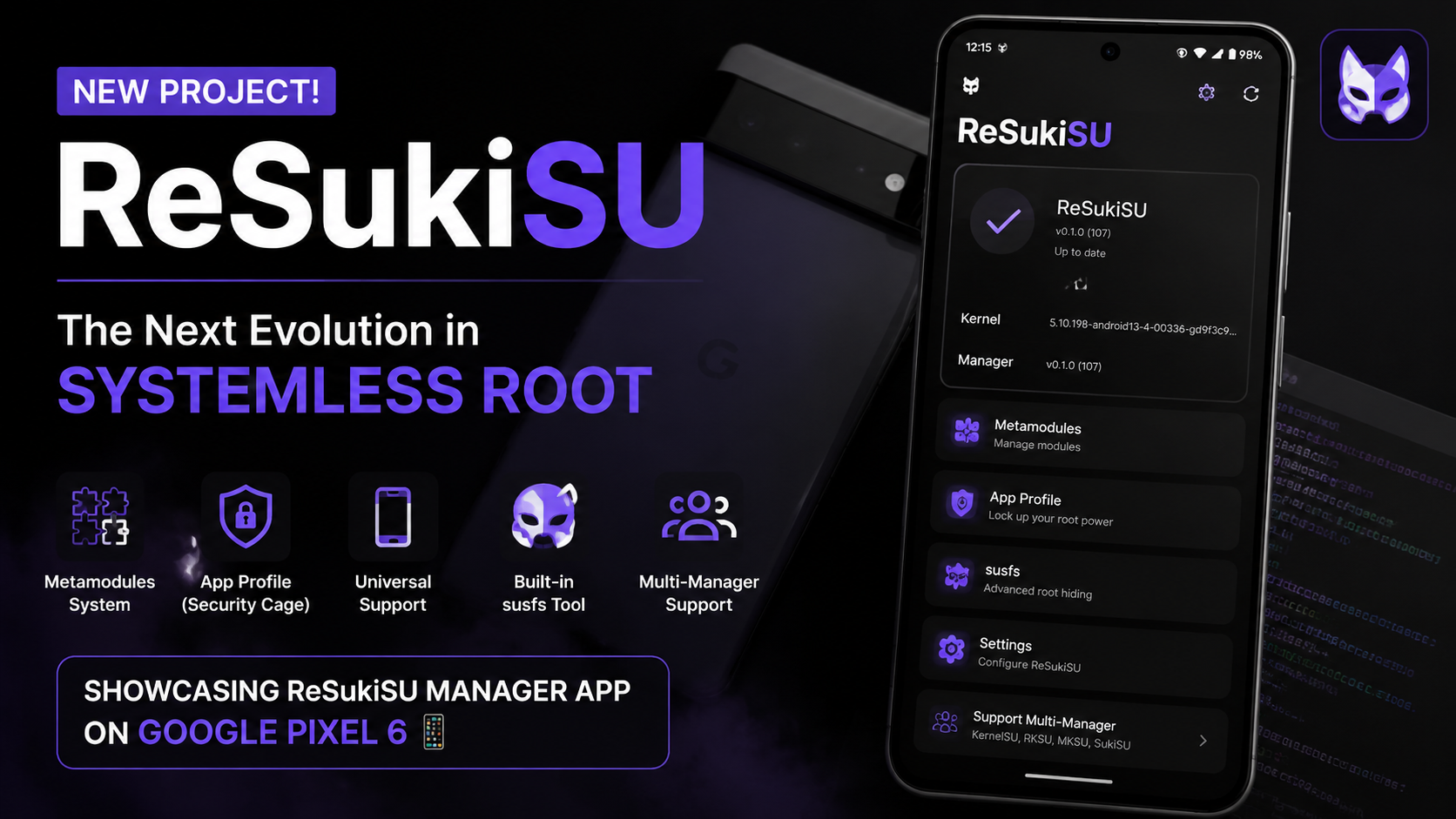
Welcome back, tech enthusiasts! If you have been following the evolution of Android device customization over the past few years, you know that the landscape is constantly shifting. We have moved far beyond the days of altering core system files directly. The community transitioned to systemless modifications, and now, we are witnessing the incredible rise of kernel-level management.
Today, I want to dive deep into a very exciting new project in this space called ReSukiSU.
As someone who loves pushing my Google Pixel 6 to its absolute limits, finding the right tools to manage administrative access—without compromising device security or stability—is a top priority. ReSukiSU builds upon the solid foundations of existing kernel solutions but introduces some truly unique capabilities designed for power users who demand absolute control and flexibility. Let’s explore what makes this manager stand out, how to get the application set up, and my thoughts on its potential.
What Makes ReSukiSU Stand Out?
At its core, ReSukiSU is an advanced manager for kernel-based superuser access. If you are familiar with the standard systemless ecosystems, you will feel right at home, but ReSukiSU brings a few distinct upgrades to the table:
- Metamodules System: This is arguably the most exciting feature. ReSukiSU utilizes a module system based on "metamodules." In simple terms, this provides a highly pluggable, modular infrastructure for all your systemless tweaks. It allows developers to create more dynamic and less intrusive modifications.
- App Profile (The "Security Cage"): Security is paramount when granting high-level access to applications. ReSukiSU introduces the App Profile feature, which essentially lets you lock up administrative power in a secure "cage." You have granular, precise control over exactly what system resources each individual app is allowed to interact with.
- Broad Device Compatibility: Whether you are rocking an older device or the latest flagship, ReSukiSU has you covered. It boasts robust support for both non-GKI (Generic Kernel Image) and GKI 1.0 devices, ensuring a wide range of hardware can benefit from its features.
- Built-in susfs Management: The app features fantastic tweaks to the user interface theme and includes a very handy, built-in "susfs" management tool. This is crucial for managing filesystem visibility, ensuring that your customized environment remains clean and undetected by apps that might refuse to run in modified environments.
- Incredible Multi-Manager Support: ReSukiSU plays extremely well with others. Its kernel support is designed to work seamlessly alongside default Official KernelSU, RKSU, MKSU, and SukiSU managers.
Watch the full tutorial here on our Youtube channel:
Step-by-Step Guide: Installing the ReSukiSU Manager App
For this hands-on test, I am using my daily driver, the Google Pixel 6. Note: For this specific guide, I am only installing the ReSukiSU Manager APK to explore the interface and features. I have not yet patched my device's kernel with ReSukiSU, as I am currently running a different kernel setup (Official KernelSU).
However, getting the manager app installed to prepare your environment or manage a compatible kernel is incredibly straightforward.
Step 1: Download the Official Package Always ensure you are sourcing your tools from the official developer repositories. Head over to the official ReSukiSU GitHub releases page using your phone's browser and download the latest Manager APK file.
Step 2: Locate the File Open your preferred Android File Manager. Navigate to your "Downloads" folder (or wherever your browser saves files). You should see the ReSukiSU APK sitting there, ready to go. The package size is quite standard and lightweight.
Step 3: Execute the Installation Tap on the APK file to initiate the installation process. If this is your first time installing an app directly from your file manager, Android may prompt you to grant "Install Unknown Apps" permission. Simply toggle that on, hit "Install," and wait a brief moment.
Step 4: Launch and Explore Once the installation finishes, tap "Open." You are now greeted by the beautifully themed ReSukiSU dashboard. Even without the kernel patched yet, you can navigate through the settings, explore the Metamodule interface, and familiarize yourself with the App Profile configurations.
My Perspectives and Analysis
Whenever a new tool enters the customization space, I like to thoroughly evaluate how it fits into a daily-driver workflow. Here are my thoughts on ReSukiSU based on my current testing and the direction of kernel-level management.
Why I Am Transitioning to ReSukiSU for Testing
Currently, my Pixel 6 is running a standard KernelSU setup, which has been incredibly reliable. However, the reason ReSukiSU has caught my attention—and why I am preparing to flash its custom kernel—comes down to modularity and security. The Metamodules concept is a game-changer for keeping the system clean. Furthermore, the "App Profile" cage is exactly what the community needs right now. Having the ability to strictly isolate administrative access means I can experiment with new developer tools without worrying about them overreaching into my personal data or destabilizing the OS.
Performance and System Stability Expectations
One of the massive benefits of moving modifications directly into the kernel space, as ReSukiSU does, is performance efficiency. Traditional systemless methods often rely on daemons running in the background, which can occasionally consume excess CPU cycles or impact battery life. Because ReSukiSU operates at the kernel level, the overhead is practically non-existent. Based on the architecture of its susfs implementation, I fully expect battery standby times on my Pixel 6 to remain untouched, while device fluidity remains at factory levels.
Potential Transition Quirks and Multi-Manager Solutions
When switching kernel management tools, the biggest headache is usually migrating your existing modules and ensuring app compatibility. This is where ReSukiSU's brilliant Multi-Manager Support saves the day.
If I encounter a bug where a specific module hasn't been updated for ReSukiSU's unique infrastructure, the multi-manager compatibility means I don't have to completely wipe my device and start over. I can theoretically retain my existing Official KernelSU manager alongside the ReSukiSU kernel to handle legacy tasks while I troubleshoot. It acts as a fantastic safety net for enthusiasts who love to tinker but still need their phone to function reliably for work the next morning.
Final Thoughts
The Android enthusiast community never stops innovating, and ReSukiSU is a perfect example of that relentless drive forward. By prioritizing security through App Profiles and flexibility through Metamodules, it represents a highly refined approach to device management.
If you are someone who enjoys deep-level system customization, ReSukiSU is absolutely worth keeping on your radar. I will be doing a full kernel patch on my Pixel 6 soon, so stay tuned to Techynoob for that complete follow-up guide.
Have you tried ReSukiSU yet, or are you currently running a different setup? Let me know your experiences and thoughts in the comments section below!
Subscribe to our YouTube channel for daily Android tips, tricks, and tutorials: TechyNoob

Discussion (0)
Post a Comment
No comments yet. Be the first to share your thoughts!