
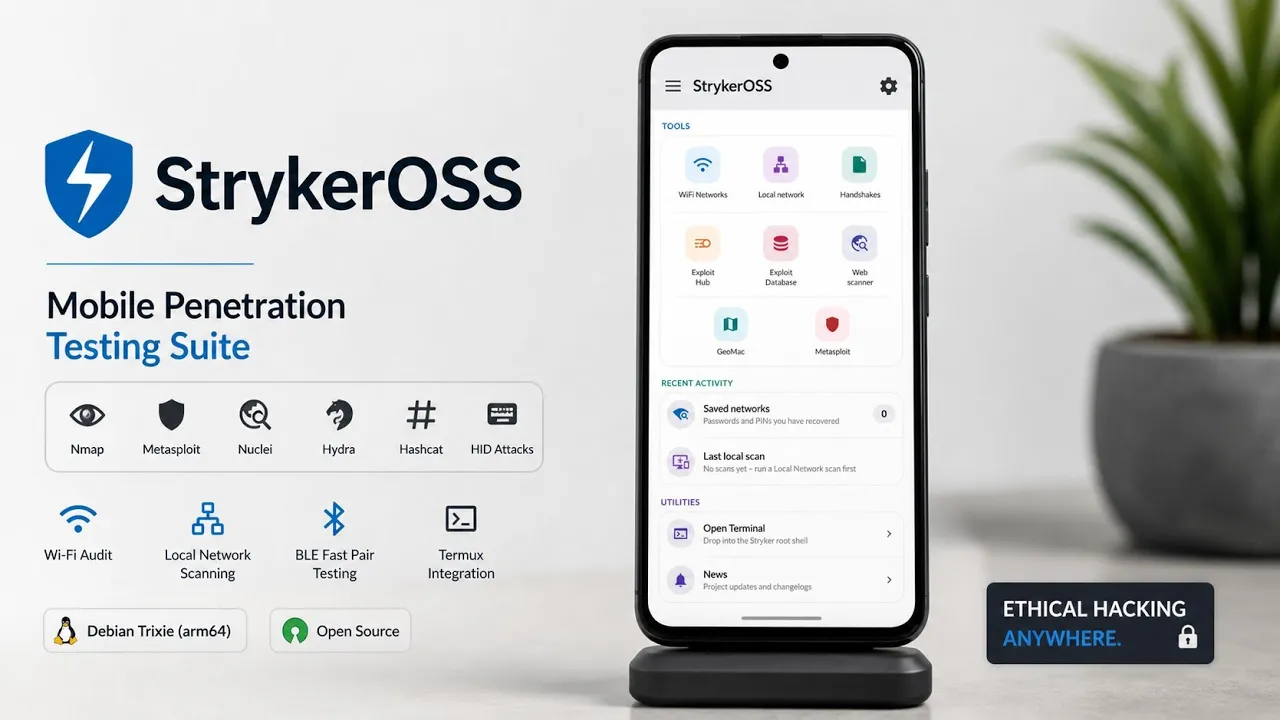
Android devices have become powerful enough to do much more than browse the web, run social media apps, and play games. With root access and the right software, a phone can also become a surprisingly capable security-testing workstation.
StrykerOSS is designed around exactly that idea.
It is a free and open-source mobile penetration-testing suite built specifically for rooted Android devices. Instead of requiring users to install and manage a collection of individual security applications and command-line tools, StrykerOSS brings many of them together inside a single Android application.
The project uses a Debian Trixie ARM64 chroot environment underneath the interface. This allows security tools such as Nmap, Metasploit, Nuclei, Hydra and SearchSploit to operate within the Android device’s environment.
That makes the project particularly interesting for authorized penetration testers, security researchers and Android enthusiasts who want a portable security toolkit.
What Do You Need?
StrykerOSS isn’t a regular Android application that you can install on any phone and immediately start using.
The script specifies that you need a rooted Android device, with Magisk or KernelSU recommended.
You should also have at least 1 GB of free internal storage available for the Debian chroot environment, dependencies and vulnerability signatures.
That storage requirement is worth keeping in mind.
The application isn’t simply installing an APK and stopping there. It needs additional files to create its underlying Linux environment, which is why having sufficient free storage is important.
Installing the APK
The initial installation is straightforward.
Locate the StrykerOSS APK using your Android file manager and open it.
Android will display the normal package-installation interface. Follow the prompts to install the application, and once the process finishes, the StrykerOSS icon should appear in the application drawer.
The more interesting part begins after installation.
Video:
Giving StrykerOSS Root Access
The script specifies that you need a rooted Android device, with Magisk or KernelSU recommended.
You should also have at least 1 GB of free internal storage available for the Debian chroot environment, dependencies and vulnerability sigBecause StrykerOSS needs to interact with parts of the Android system that ordinary applications cannot access, root permission is required.
If you’re using KernelSU, open the Superuser management section, locate StrykerOSS and grant it the required access.
With Magisk, the root permission request can appear automatically when the application starts.
According to the script, root access allows StrykerOSS to work with things such as loop devices, filesystem mounts and hardware interfaces.
This is also why StrykerOSS shouldn’t be treated like a normal Play Store-style application.
Root access gives the application considerably more control over the device, so it should only be installed and used on a device you own or are explicitly authorized to test.
Setting Up the Debian Environment
The first time StrykerOSS launches, it needs to prepare its underlying environment.
After granting the required storage permissions, the application begins setting up the Debian Trixie ARM64 chroot.
The setup process extracts the root filesystem, configures environment paths and checks the required dependencies. It also validates the files and mounts the environment so that the security tools can be accessed from inside StrykerOSS.
One thing I like about this approach is that you don’t have to separately open a terminal emulator just to get the environment running.
The application handles the initial setup itself.
Once initialization is complete, the tools are accessible through the main dashboard.
The StrykerOSS Dashboard
The main interface is essentially a central control panel for the security tools.
At the top, the Chroot Engine indicator shows the current status of the underlying Linux environment and its active mounts.
Below that is the tools grid, which provides access to the different testing modules.
This is where the concept behind StrykerOSS becomes much clearer.
Instead of opening separate applications for different parts of a security assessment, the interface attempts to keep everything in one place.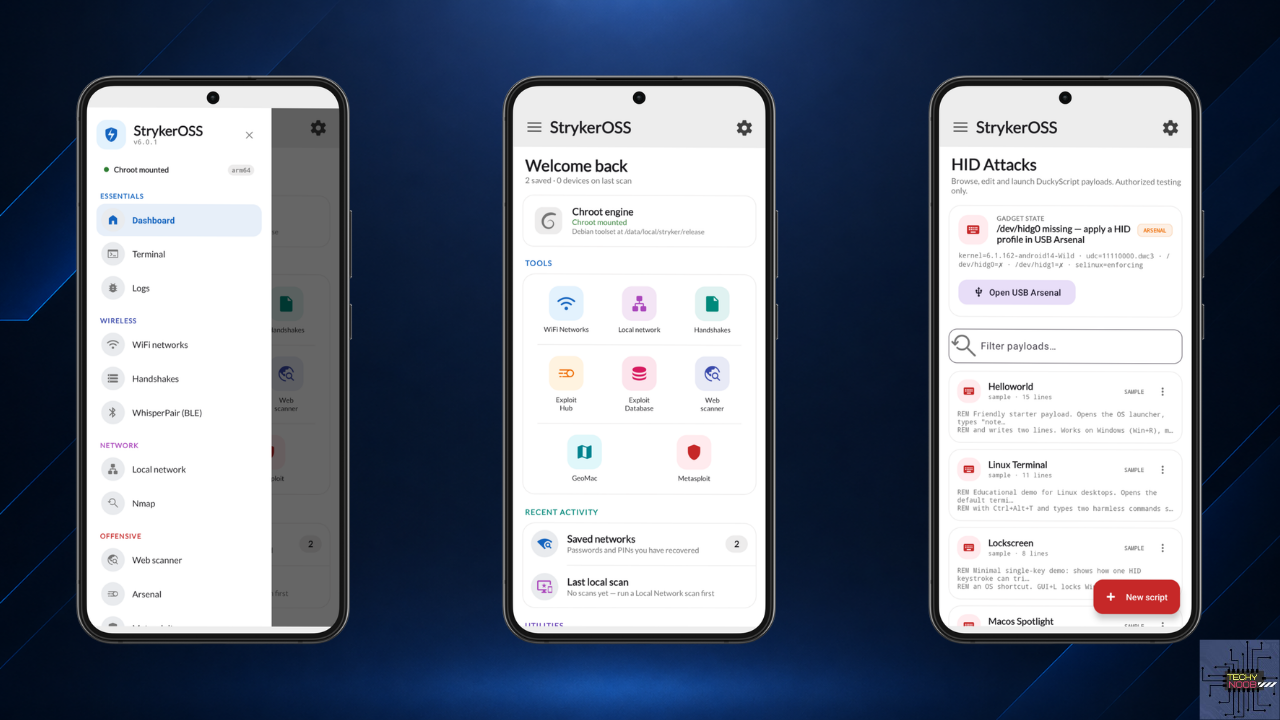
Wi-Fi Testing
The WiFi Networks module is intended for wireless assessment workflows.
According to the script, it can scan nearby access points and work with external USB wireless adapters that support monitor mode.
Captured information can then be managed through the Handshakes section, which provides local storage, export functionality and hash-processing capabilities.
The external-adapter requirement is important.
A phone’s built-in Wi-Fi hardware isn’t automatically capable of every wireless-testing function. Compatible external hardware may be required depending on the particular testing workflow.
And, of course, wireless testing should only be performed against networks you own or have explicit authorization to assess.
Local Network and Nmap
For network assessments, StrykerOSS provides both a Local Network module and an integrated Nmap module.
The script describes capabilities including host discovery, port scanning and OS fingerprinting.
It also allows Nmap scripts to be executed with their output displayed directly in the application.
Having Nmap available through a graphical Android interface can be convenient for quick assessments.
It also means you can perform certain network-discovery tasks without carrying a laptop everywhere.
Again, the important limitation is authorization. Scanning systems that you don’t own or don’t have permission to test can create security and legal problems.
Web Application Testing With Nuclei
StrykerOSS also includes Nuclei for web-security scanning.
The integrated scanner can perform multi-target assessments and organize findings according to severity.
Nuclei is particularly useful in security testing because its template-based approach allows researchers to check targets against known classes of vulnerabilities and security issues.
But automated scanners should be treated as an aid rather than a replacement for manual testing.
A scanner can identify potential issues, but the result still needs to be interpreted and verified by the person conducting the assessment.
Exploit and Research Tools
The dashboard also includes several other security-related components.
These include:
- Exploit Hub
- Exploit Database
- Metasploit integration
- GeoMac
The script describes GeoMac as providing functionality for mapping wireless coordinates, while the other modules provide access to exploit research and penetration-testing functionality.
Having these resources available from the same interface can make StrykerOSS feel more like a compact security workstation than a conventional Android application.
Built-In Debian Terminal
One of the more useful features is hidden toward the bottom of the interface.
The Utilities section includes an embedded terminal launcher.
Opening it drops you directly into the Stryker Debian chroot shell with root privileges, giving you access to the underlying Linux environment without requiring a separate terminal application.
This is particularly useful for users who are comfortable with command-line security tools.
You can use the graphical modules when they are convenient and move into the terminal when you need more direct control.
That combination gives StrykerOSS a nice balance between a graphical interface and the flexibility of a Linux shell.
Why Run Security Tools on Android?
The biggest advantage is portability.
A laptop remains the better option for many serious penetration-testing tasks, particularly when you need specialized hardware, multiple network interfaces, large displays or extensive processing resources.
But a rooted Android phone is something many people already carry with them.
Having a compact environment containing tools such as Nmap, Metasploit, Nuclei and other security utilities means you can perform certain authorized assessments without having to bring a full computer along.
It’s not about replacing a professional workstation.
It’s about having another option.
Things to Keep in Mind
StrykerOSS requires root, so it isn’t suitable for an unmodified Android device.
It also uses additional storage for the chroot environment and its supporting files.
Hardware compatibility can matter too, particularly for wireless testing with external adapters.
And because the application provides powerful security tools, users need to understand what those tools actually do before using them.
A penetration-testing toolkit is not automatically safe simply because it is packaged inside a convenient Android application.
Use it responsibly and only against systems and networks for which you have permission.
Final Thoughts
StrykerOSS is an interesting project because it brings a collection of traditionally Linux-oriented security tools into a more accessible Android interface.
Underneath the application is a Debian Trixie ARM64 chroot, while the front end provides access to networking, wireless, web-security and exploitation-related tools.
The combination of Nmap, Nuclei, Metasploit, SearchSploit, wireless-testing functionality and an integrated Debian terminal makes it considerably more capable than a simple Android security utility.
The main requirement is that your phone needs to be rooted, and you’ll need enough storage for the Linux environment and its supporting data.
For security researchers and penetration testers who already have a compatible rooted Android device, StrykerOSS offers an interesting way to turn that phone into a portable security-testing environment.
Just remember that the power of these tools comes with responsibility: use them on your own infrastructure, laboratory environments or systems where you have explicit authorization to perform security testing.
Requirements: Rooted Android device, preferably Magisk or KernelSU, with at least 1 GB of free internal storage.
Environment: Debian Trixie ARM64 chroot
Tools mentioned: Nmap, Metasploit, Nuclei, Hydra, SearchSploit and additional security utilities.
Download: StrykerOSS
Discussion (0)
Post a Comment
No comments yet. Be the first to share your thoughts!