
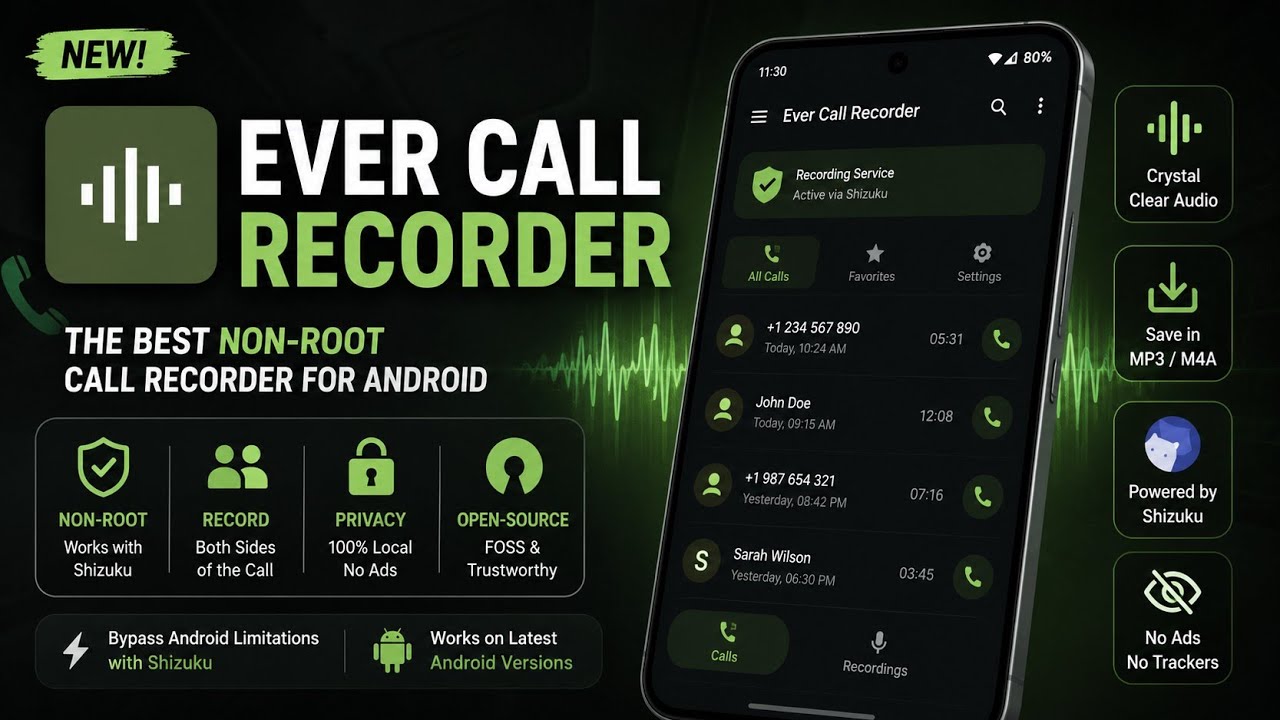
Call recording on Android has become increasingly complicated over the years. Depending on the device, Android version, dialer application, and regional restrictions, recording both sides of a phone conversation may not work as expected. On some phones, the built-in recorder may announce that the call is being recorded, while on others, third-party applications may only capture your own voice.
Ever Call Recorder takes a different approach. It is an open-source Android call-recording application that uses Shizuku to access the functionality it needs without requiring traditional root access. The project is based on ShizuCallRecorder and is designed to record both sides of supported calls and save the recordings as audio files.
I tested Ever Call Recorder on my Redmi Note 7 Pro running MatrixxOS, based on Android 16 QPR2. In this article, I’ll explain what the application does, how the Shizuku-based approach works, what you need before installing it, and the important limitations you should understand before using a call-recording application.
What Is Ever Call Recorder?
Ever Call Recorder is an open-source call-recording application designed to work without traditional root access. Instead of asking the user to modify the system through Magisk or another root solution, it uses Shizuku to obtain elevated Android permissions.
According to its official project information, the application supports automatic recording for incoming and outgoing calls, manual recording, two-sided recording, recording from supported communication applications, recording management, notes, favourites, and adjustable recording quality.
This makes it particularly interesting for users who already use Shizuku for Android customization and want to experiment with call recording without rooting their phone.
However, “without root” does not mean that the application works automatically after installing the APK. Shizuku is an important part of the setup, and the behaviour of call recording can vary depending on the Android version, device software, and audio-routing restrictions.
My Testing Setup
For this test, I used the following configuration:
- Device: Redmi Note 7 Pro
- ROM: MatrixxOS
- Android: Android 16 QPR2
- Access method: Shizuku
- Root: Not required for the application
This is important because Android’s audio and permission behaviour can differ significantly between devices and ROMs. A result observed on one phone should therefore not automatically be treated as a guarantee for every Android device.
Watch the Video Demonstration
If you prefer seeing the complete setup and operation instead of following only written instructions, I’ve also demonstrated Ever Call Recorder in a video.
The video provides a practical look at the application and its setup, while the rest of this article covers the important details and limitations in more depth.
How Does It Work?
The key component behind Ever Call Recorder is Shizuku.
Shizuku provides applications with access to certain Android APIs that normally require higher privileges. This allows compatible applications to perform operations that would otherwise require root or direct ADB interaction.
Ever Call Recorder uses this mechanism instead of requiring you to install Magisk simply for the purpose of running the recorder. The project’s official repository identifies Shizuku as a core requirement and explains its relationship with the underlying ShizuCallRecorder project.
This approach can be useful for users who want to keep their phone unrooted while still using advanced Android applications.
Keep in mind, though, that Shizuku itself needs to be running. Depending on your setup, it may need to be started again after a reboot or when its service stops.
Setting Up Ever Call Recorder
The basic process is straightforward.
First, install a compatible version of Shizuku and start its service. Depending on your device and configuration, this can involve wireless debugging/ADB or another supported Shizuku setup.
Next, install Ever Call Recorder and grant the permissions it requests. The application can then use the Shizuku service to perform the operations required for recording.
Before relying on it for an important conversation, make a test call and check the resulting audio file. This is particularly important on custom ROMs because audio routing and telephony implementations can vary.
You can download the version used for this video here:
For the source code and project information, visit the official Ever Call Recorder GitHub repository.
Features Worth Knowing
One useful feature is automatic call recording, which can remove the need to manually start recording during every call. The project also lists manual recording, two-sided recording, recording management, notes, favourites, sorting, automatic cleanup options, and adjustable recording quality.
The storage-management options are particularly useful if you record calls regularly. Audio files can accumulate quickly, so automatic cleanup based on time or storage limits can help prevent recordings from unnecessarily consuming storage.
The application also includes an app-lock feature, according to the project’s documentation. This can be useful because call recordings may contain sensitive conversations or personal information.
Important Limitations
The biggest thing to understand is that call recording compatibility is not universal.
Android manufacturers can implement telephony and audio systems differently, and newer Android versions continue to introduce changes to permissions and system APIs. Even if an application works correctly on one device, it may not produce the same result on another.
Shizuku itself has also had Android 16 compatibility changes and reports around different Android 16 builds, which highlights why users should always check the current project information before troubleshooting a setup.
For this reason, don’t assume that installing Ever Call Recorder guarantees two-sided recording on every phone.
Privacy and Legal Considerations
Call recordings can contain extremely sensitive information. Before recording a conversation, make sure you understand the laws and regulations that apply where you live and where the other participant is located.
You should also protect stored recordings just as you would protect private messages, photographs, or documents. Avoid uploading recordings to unnecessary third-party services and consider using the application’s security features where appropriate.
Most importantly, don’t use call recording to violate another person’s privacy or applicable laws.
Final Verdict
Ever Call Recorder is an interesting option for Android users who want to experiment with call recording without installing Magisk or obtaining traditional root access. Its use of Shizuku makes the concept particularly appealing to users who already rely on Shizuku for Android customization.
On my Redmi Note 7 Pro running MatrixxOS based on Android 16 QPR2, it was useful to test this approach on a relatively old device running a modern Android-based custom ROM.
The main takeaway is that Ever Call Recorder should be viewed as a device- and software-dependent solution, rather than a universal replacement for every phone’s built-in call recorder.
If your device, ROM and audio configuration are compatible, it can provide a convenient way to explore call recording without rooting the entire phone. If it doesn’t work correctly, however, the problem may be related to Android’s audio restrictions or your device’s implementation rather than simply the application itself.
For users interested in advanced Android customization, the combination of Shizuku + open-source applications remains one of the more interesting ways to access additional functionality without traditional root.

Discussion (0)
Post a Comment
No comments yet. Be the first to share your thoughts!