
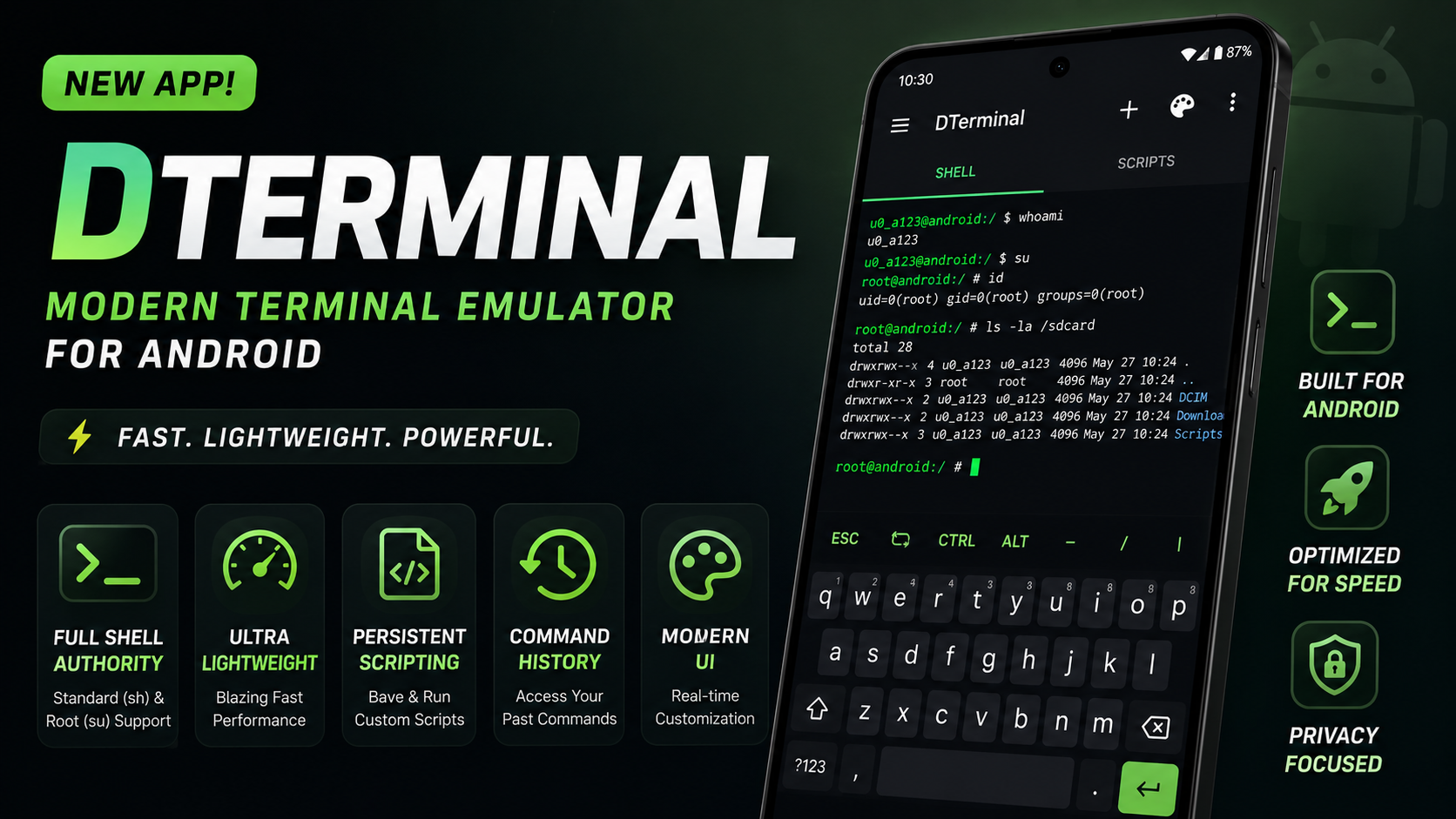
Android has always been the go-to operating system for enthusiasts, developers, and power users who love complete control over their hardware. However, anyone who has spent time running scripts or managing system commands on mobile knows a major pain point: traditional terminal apps can feel incredibly clunky. Many options available today suffer from noticeable input lag, heavy battery drain, or interfaces that look like they haven’t been updated since 2012.
That is exactly why DTerminal is turning heads. Built from the ground up to be a modern, lightweight, and highly reactive terminal emulator for Android, it strips away the bloat and delivers an incredibly fluid command-line experience. Whether you need standard system access or full root authority, this utility is built for maximum efficiency.
What Makes DTerminal Stand Out?
Most mobile terminal applications rely on older rendering engines that struggle with rapid text output, causing the UI to stutter during heavy execution. DTerminal fixes this by utilizing an asynchronous architecture. This means your commands execute at high speed in the background without locking up the visual interface.
Key Features at a Glance:
- Full Shell Authority: Seamless execution for both standard (sh) and elevated root (su) commands with zero delay.
- Ultra-Lightweight Architecture: Optimized specifically to minimize CPU overhead and keep battery consumption incredibly low.
- Persistent Scripting Workspaces: A built-in management environment where you can save your most-used custom scripts, entirely eliminating repetitive typing.
- Material You Integration: A beautifully adaptive user interface that responds instantly to font changes, color adjustments, and system themes.
- Clean Command History: A persistent, organized log that makes searching for and recalling past commands effortless.
Watch the full tutorial here on our Youtube channel:
Step-by-Step Installation & Setup Guide
Getting DTerminal running on your device is incredibly straightforward, as it sidesteps overly complex initial configuration screens.
Step 1: Locating the APK File
Because DTerminal focuses on keeping things lightweight and efficient, the installation package is exceptionally compact. Download the official APK file and open your preferred Android file manager. Navigate straight to your Downloads folder to locate the file.
Step 2: The Installation Process
Tap on the DTerminal APK file. If your browser or file manager prompts you for permission to install apps from unknown sources, toggle the permission to "Allow." Click Install at the bottom right. Due to the tight optimization of the code, the installation completes in just a few short seconds.
Step 3: Launch and Shell Initialization
Once the installation finishes, tap Open. Upon the very first launch, the app immediately connects to your local system shell. There are no tedious configuration wizards or directory setup pop-ups. If your device is rooted via Magisk or KernelSU, a superuser request prompt will appear right away. Granting this gives the app full system authority, dropping you directly into a live, responsive command line.
Why I Use This Utility Daily
For anyone managing automated tasks, editing system files on the go, or debugging mobile applications, efficiency is everything. The standout feature that keeps DTerminal in my daily workflow is the Persistent Scripting Workspace.
Instead of opening a separate text editor, copying a multi-line script, switching back to the terminal, and pasting it, DTerminal allows you to save custom scripts directly within the app interface. If you regularly run commands to clear system caches, pull logcats, or trigger backup scripts, you can deploy them with a single tap. It transforms the terminal from a basic prompt into a highly tailored automation dashboard.
Battery Impact and Performance Analysis
A major issue with running prolonged scripts or background processes on traditional Android terminals is thermal throttling and heavy battery drain. Mobile devices are aggressive with background process management, meaning poorly optimized apps will rapidly chew through battery cycles.
During extensive testing—running continuous loops, parsing massive text logs, and executing consecutive shell operations—DTerminal remained remarkably light on system resources. The RAM footprint stays minimal because it avoids loading unnecessary visual bloat or heavy background background trackers. The implementation of Material You design standards isn't just about aesthetics; it ensures the visual rendering engine hooks directly into native system layouts, keeping CPU cycles low and saving battery life over long scripting sessions.
Potential Bugs and How to Address Them
No piece of software is entirely flawless across the thousands of unique Android device configurations out there. While DTerminal is exceptionally stable, you may encounter minor quirks depending on your specific ROM or root solution.
1. Root Access Disconnects or Fails to Grant
On certain aggressive custom ROMs or newer versions of Android, the initial su request can occasionally time out if your root manager (like Magisk) is set to a strict notification delay.
- The Fix: If the terminal opens but fails to execute root commands, close the app completely. Open your root manager app, manually locate DTerminal under the superuser permissions tab, and explicitly toggle access to "Allowed." Restart the app, and full shell authority will be restored.
2. Custom Fonts Disorting the UI Layout
Because DTerminal features real-time, reactive customization of fonts, importing highly non-standard or overly stylized custom TrueType fonts (TTF) can sometimes lead to text clipping or alignment errors on the terminal matrix.
- The Fix: Stick to monospaced fonts designed specifically for coding or terminal layouts (such as JetBrains Mono, Fira Code, or Source Code Pro). These fonts guarantee that character spacing remains uniform, ensuring the interface renders perfectly every single time.
Final Verdict
DTerminal successfully delivers exactly what it promises: a fast, elegant, and uncompromising command-line experience for Android. By focusing heavily on raw performance, asynchronous execution, and useful daily utilities like persistent scripting, it cuts through the clunkiness of older alternatives. It is a highly optimized tool that deserves a spot on the device of every Android power user.
Subscribe to our YouTube channel for daily Android tips, tricks, and tutorials: TechyNoob


Discussion (0)
Post a Comment
No comments yet. Be the first to share your thoughts!