
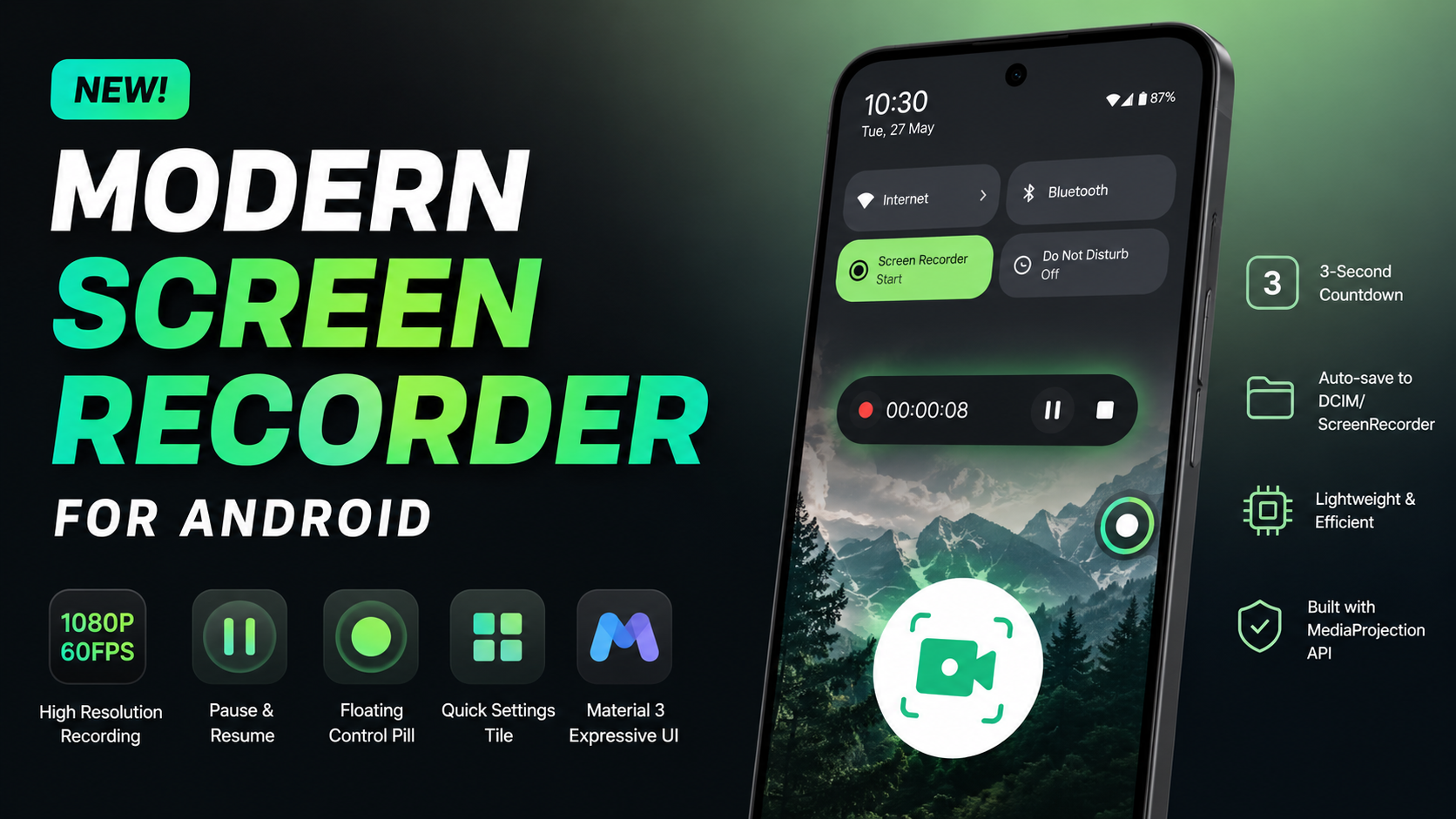
Finding a reliable screen recording application on Android that doesn't bog down your system, bombard you with intrusive watermarks, or drain your battery can feel like searching for a needle in a haystack. While many modern devices come with a native tool built into the quick settings panel, these stock utilities often lack advanced control features, customization, and lightweight resource management.
To solve this dilemma, a fresh solution has emerged: a modern, open-source Android screen recorder built entirely in Kotlin using the native MediaProjection API. Stripped of unnecessary fluff and bloated background tracking, this utility delivers an ultra-smooth experience framed inside Google's latest Material 3 Expressive user interface guidelines.
Here is an in-depth breakdown of how this application operates, a detailed step-by-step guide to installing and utilizing its features, and a realistic performance analysis based on daily continuous use.
Technical Core: What Makes It So Fast?
Most third-party recording suites act as heavy software overlays, constantly chewing through random-access memory (RAM) and causing noticeable frame drops during intense tasks like mobile gaming or high-definition streaming. This application sidesteps those performance bottlenecks by relying on a highly optimized codebase.
- Native MediaProjection API: Instead of employing non-standard rendering pipelines, the app hooks directly into Android's core system architecture. This ensures direct hardware-accelerated video capture without injecting lag.
- Kotlin Architecture: Written strictly in modern Kotlin, the app benefits from structured concurrency through coroutines, yielding rapid startup times and zero lingering background services when the app is idle.
- Modern MediaStore Integration: By using modern scoped storage frameworks, the app writes video chunks seamlessly directly into the system's public media directories without demanding broad, risky storage permissions.
Watch the full tutorial here on our Youtube channel:
Step-by-Step Installation and Setup Guide
Because this application focuses on privacy and lean builds, it is distributed directly as an optimized Android Application Package (APK) file. Getting it up and running on your smartphone takes less than a minute.
Step 1: Downloading and Locating the Package
First, acquire the compilation build package from the trusted repository thread. Once finished, open your device's native file manager utility and navigate to your main downloads directory. The first thing you will notice is the incredibly minuscule file size—a visual proof of its lightweight programming architecture.
Step 2: Running the Installation
Tap directly on the installer file. If you have not manually enabled software installations from your specific file manager before, Android will request a quick security toggle to "Allow installation from unknown sources." Switch the toggle to active, return to the screen, and press Install. Within roughly three to five seconds, the interface will confirm the system integration is complete.
Step 3: Granting Essential System Permissions
Launch the tool from your application drawer. To capture data correctly without standard barriers, the app requires two core configurations upon the initial startup:
- Display Over Other Apps: This allows the smart floating pill interface to draw on top of your mobile games or tutorials, granting you instant pause and stop access.
- Media Projection & Audio Access: A standard system prompt will appear asking for authorization to capture your screen contents. Rest assured, this remains entirely local on your physical hardware.
Deep Dive Feature Tour
The application relies on absolute minimalism, dedicating every pixel of real estate to core usability. The home layout showcases a clean visual dashboard utilizing dynamic Material 3 accents that automatically shift based on your system theme colors.
High-Resolution Target Capturing
The recorder automatically scans the precise hardware display specifications of your device. Rather than locking high resolutions behind premium payment barriers, it natively initializes recording at the absolute highest video resolution, frame rate, and bitrate configuration supported by your smartphone panel.
The Dynamic Floating Control Pill
Once recording is initiated, a sleek green floating action pill settles unobtrusively onto the margin of your screen. This floating element acts as a physical master control deck, letting you seamlessly hit Pause or Resume mid-action. Instead of chopping your sessions into five separate video clips that you later have to patch together in a video editor, the system seamlessly appends the video track live within a single container file.
Instant Quick Settings Tile Integration
For power users who prefer an empty app drawer, the tool features seamless integration into the notification pane drop-down menu. You can quickly edit your system quick-toggles, drag the custom recorder icon directly into your main row, and launch a crisp capture sequence instantly from any screen without ever manually opening the primary software dashboard.
Performance Analysis & Daily Real-World Experience
Why I Use This Utility Daily
In my standard digital routine, I frequently capture short software bugs, app demonstrations, and interface layouts. Most stock options require awkward navigation paths, while bloated alternatives clutter my notification history. This tool has become an essential asset because it completely eliminates operational friction. There are no splash screens, no analytical data trackers uploading data in the background, and the 3-second countdown timer grants me the ideal window to hide background notifications before the recording begins.
Battery Impact and Resource Overhead
During a continuous twenty-minute video test run at maximum resolution, the hardware thermal profile remained perfectly stable. Because the MediaProjection framework passes rendering work straight to the hardware encoder, battery drain hovered at a marginal three percent—virtually identical to the power usage of the native system recorder. It keeps system memory pressure incredibly low, allowing demanding games to run concurrently at high frame rates without experiencing erratic memory allocation crashes.
Storage Optimization and the MediaStore Folder
When you tap the stop button, the processing engine instantly hands the video processing pipeline over to the system MediaStore architecture. The file automatically compiles and saves safely within your root internal directory path: DCIM/ScreenRecorder/. By sticking strictly to standard Android paths, your recorded clips immediately appear inside your preferred gallery apps (like Google Photos or local galleries) ready for instant cloud backup or sharing.
Final Verdict
This Kotlin-based utility shows exactly how elegant mobile software becomes when developers prioritize usability over commercial ad-bloat. It provides a reliable, secure, and visually appealing workspace that respects system resources while maintaining pristine video captures. If you want a distraction-free recording tool that handles heavy workloads without stuttering, adding this utility to your daily workflow is an absolute no-brainer.
Subscribe to our YouTube channel for daily Android tips, tricks, and tutorials: TechyNoob
Discussion (2)
Post a Comment