
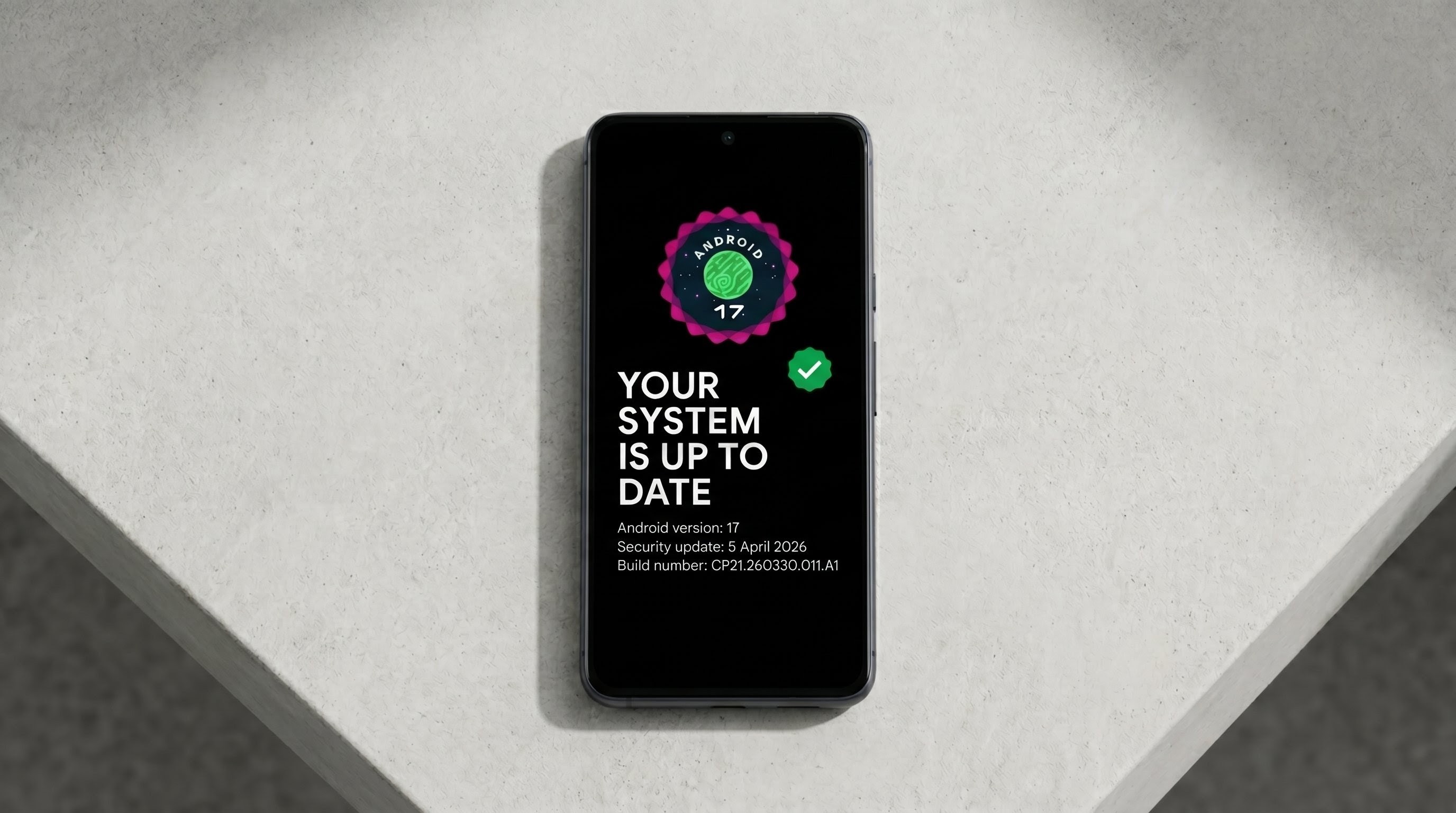
The journey toward the stable release of Android 17 is nearly at its finish line. For Google Pixel enthusiasts and developers who have been navigating the exciting new features of the latest operating system, the experience has been largely positive, though naturally accompanied by a few beta-phase quirks. Today, Google has taken another significant step in polishing the software by releasing Android 17 Beta 4.1 for eligible Pixel devices.
While Google noted back in mid-April that Beta 4 was slated to be the final scheduled major beta of this release cycle, the arrival of a ".1" patch is both common and highly welcome. These minor point updates are essential for squashing lingering bugs, refining the user experience, and ensuring absolute system stability before the software is pushed to the global public.
If you are a Pixel user enrolled in the beta program, here is a comprehensive breakdown of everything you need to know about the Android 17 Beta 4.1 update, including build details, security patches, and the crucial bug fixes it brings to your smartphone.
Build Details and Security Updates
First and foremost, this is officially categorized by Google as a "minor update" to the existing Android 17 Beta 4 infrastructure. When you download the update, your device will be bumped up to build number CP21.260330.011 (with a slight variation for the Pixel 6, Pixel 6 Pro, Pixel 6a, Pixel 7, and Pixel 7 Pro, which will see build number CP21.260330.011.A1).
Importantly, this release incorporates the May 2026 security patch. This ensures that while you are testing the bleeding-edge features of Android 17, your device remains protected against the latest known security vulnerabilities. It is a vital inclusion that keeps your personal data secure as the operating system gets finalized.
What Has Been Fixed in Android 17 Beta 4.1?
The primary focus of this update is system stability and interface synchronization. Google has actively listened to community feedback from the issue tracker and addressed several specific pain points that were hindering the daily user experience. Let's explore the key fixes included in this patch:
- Accurate Signal Display: One of the most visually confusing bugs in recent weeks involved the status bar. Users reported that their phones were incorrectly displaying zero signal bars, leading them to believe they had lost service, even when they had full, active cellular connectivity. This visual synchronization error has been completely resolved.
- Quick Settings and Airplane Mode Sync: Another interface quirk involved the Quick Settings panel. When toggling Airplane mode on, the mobile data icon would sometimes remain illuminated and appear active, creating confusion about the device's actual network status. Beta 4.1 properly synchronizes these toggles, ensuring the UI accurately reflects your hardware states.
- External Display Resolution Fixes: For power users who frequently utilize their Pixel's display output capabilities, connecting to an external monitor was occasionally problematic. Selecting high-resolution outputs would sometimes result in a completely black screen. This patch restores the proper handshake protocols, allowing seamless scaling and high-resolution projection.
- Seamless Bluetooth Audio Routing: If you rely heavily on Bluetooth headphones or wireless speakers, you may have encountered a frustrating audio drop. Previously, system interruptions—such as an alarm going off or a timer finishing—would cause media playback to go completely silent instead of properly routing the audio back to the active media player. This routing pipeline has been smoothed out for uninterrupted listening.
- Crucial Accessibility Hardware Pairing: Perhaps the most critical fix in this entire release targets accessibility. Users who rely on Bluetooth-enabled hearing aids reported a severe issue where their Pixel would automatically "forget" the paired medical devices after a period of inactivity or after being placed on a charger. This required constant, tedious repairing throughout the day. Google has addressed the root cause, ensuring that essential hearing aids remain reliably paired and functional.
Who Should Install This Update?
It is important to note the specific target audience for this release. The Android 17 Beta 4.1 update is specifically designed for users who are on the standard Android 17 Beta track and did not transition to the newer Android 17 QPR1 (Quarterly Platform Release) beta program.
If you meet this criteria and have a compatible Pixel device enrolled in the Android Beta program, you don't need to do anything complex. Google is actively offering this as an over-the-air (OTA) update. Simply navigate to your phone's Settings > System > System update to check for the prompt.
For advanced users and developers who prefer manual installations, Google has also made both the Factory Images and OTA images available for download on the Android Developer portal. Existing Beta 4 users can safely sideload the OTA image without wiping their device data.
Final Thoughts
As we edge closer to the official, stable launch of Android 17, updates like Beta 4.1 are a great reminder of why public beta testing is so valuable. By crowdsourcing bug reports, Google can pinpoint and resolve highly specific issues from UI visual glitches to critical accessibility hardware disconnections ensuring a polished final product for millions of users worldwide.
Make sure to download the update, enjoy the smoother experience, and let us know your thoughts on the final stages of Android 17 in the comments below!
Discussion (0)
Post a Comment
No comments yet. Be the first to share your thoughts!